
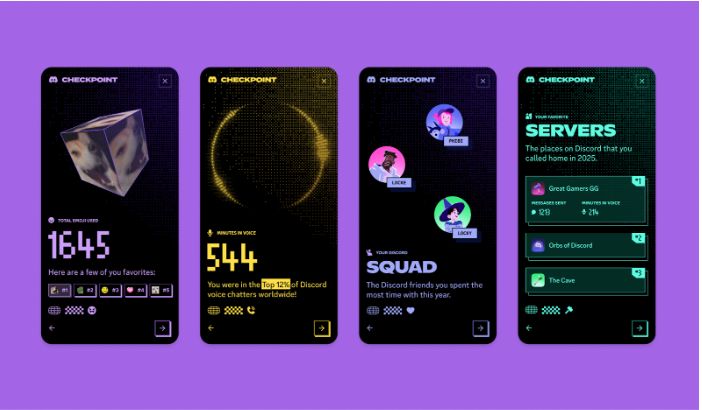
Discord rolled out its first year-in-review feature called Checkpoint on December 4, 2025, joining platforms like Spotify and YouTube in the annual recap trend. The feature gives Discord’s 200 million monthly active users a detailed look at their 2025 activity across messages, voice chats, games, and communities.
Checkpoint reveals how many messages users sent, hours spent in voice channels, top servers, most-contacted friends, and the five games they played most. The launch celebrates Discord’s 10th anniversary and marks the platform’s first attempt at personalized year-end summaries. Users who had data personalization enabled throughout 2025 can access their stats until January 15, 2026.
Discord Checkpoint 2025: Your Year in Numbers
The platform’s first personalized recap celebrating a decade of gaming communities
What Your Discord Checkpoint Shows
Discord launched Checkpoint to celebrate its 10th anniversary, providing users with comprehensive activity statistics from 2025. The feature requires having “Use data to personalize my Discord experience” enabled in settings. Similar end-of-year features have become standard across digital platforms, with technology companies finding new ways to engage users with their own data.
How to Access Your Discord Checkpoint
Users need the latest Discord app version to view their Checkpoint. The feature rolled out gradually from December 4, with mobile access temporarily disabled on December 5 due to technical issues. For updates on related platform developments, see coverage of Android 16 QPR2 and iOS 26.2 updates.
-
1Update Discord AppMake sure you’re running the latest version. Desktop apps update automatically when restarted.
-
2Find the Flag IconLook for a small flag icon in the top-right corner of your Discord window, near the inbox.
-
3Click to ViewClick the flag icon or the pop-up banner that appears when you open Discord.
-
1Update Through App StoreMobile apps may need manual updates. Check your device’s app store for the latest Discord version.
-
2Open “You” TabTap the “You” tab at the bottom-right of the Discord mobile app.
-
3Tap Checkpoint BannerSelect the green Checkpoint banner to view your recap. Note: Mobile access was temporarily disabled on December 5 but should be restored.
-
✓Active in 2025You must have used Discord throughout 2025 with sufficient activity to generate meaningful statistics.
-
✓Data Personalization EnabledThe “Use data to personalize my Discord experience” setting must have been enabled during 2025. Turning it on now won’t generate a 2025 recap but prepares you for future years.
-
✓Latest App VersionUpdate your Discord app to the most recent version available for your device.
Global Discord Statistics for 2025
Discord revealed platform-wide data showing how 200 million monthly users communicated and played together throughout 2025.
Most Used Emojis Worldwide
Top Games on Discord
Discord Checkpoint Timeline
The rollout schedule for Discord’s first year-in-review feature.
Discord Checkpoint provides users with personalized statistics from their 2025 activity, including message counts, voice hours, top games, and most-used emojis. The feature became available on December 4, 2025, and can be viewed until January 15, 2026, for users who had data personalization enabled throughout the year.
The platform reported 744 billion messages sent globally, with the red heart emoji used 2.18 billion times as the most popular reaction. League of Legends maintained its position as the most-played game on Discord. Users receive exclusive avatar decorations matching one of 10 Checkpoint card designs based on their activity patterns. For more technology updates, see our coverage of Samsung’s Galaxy Z Tri-Fold, Micron discontinuing the Crucial brand, and Venmo’s outage affecting 71,000 users.
View Your Discord Checkpoint
Open Discord on desktop or mobile to explore your 2025 stats. See which friends you connected with most, discover your top games, and find out which emojis defined your year. The recap remains available until January 15, 2026.
Read Official AnnouncementAvailable until January 15, 2026 • Requires data personalization enabled