iOS 26.2 launches December 8-16 with Urgent Reminders alarms, screen flash alerts for iPhone 11+

GigaNectar Team

iOS operating system logo and branding showing Apple's mobile platform interface design with blue gradient background and iOS text
iOS 26.2 Interactive Features Guide

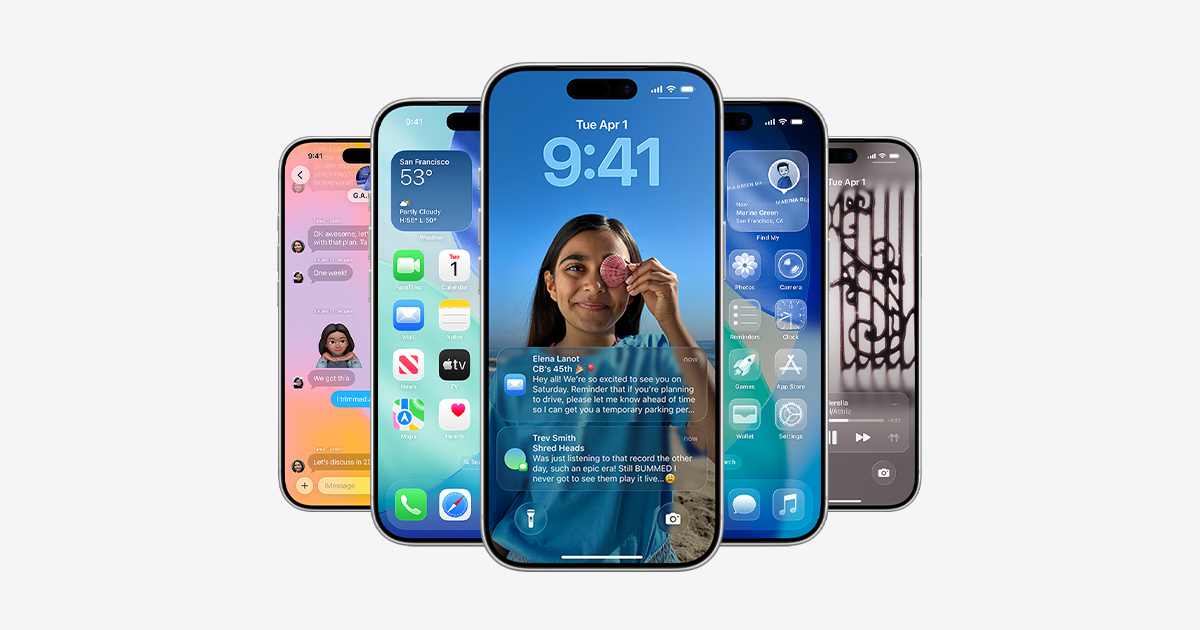
Apple released the iOS 26.2 Release Candidate to developers on December 3, 2025, marking the final testing phase before public launch. The update arrives two weeks after the third beta and delivers several user-focused enhancements across the iPhone operating system. iOS 26.2 expands customization options for the Lock Screen, adds accessibility features for notifications, and brings long-requested functionality to the Reminders app. The update also includes CarPlay improvements and refinements to the Liquid Glass design language introduced with iOS 26 in September 2025.

Users running iPhone 11 and newer models can expect the public release between December 8 and December 16, 2025, based on Apple’s typical release patterns for x.2 updates. The software update continues Apple’s focus on making iOS 26 more customizable while maintaining the core design vision. Similar updates are coming to other Apple platforms, including iPadOS 26.2, macOS Tahoe 26.2, watchOS 26.2, and tvOS 26.2, all scheduled for the same release window.

Expected: December 8-16, 2025

iOS 26.2 Features Arriving Soon

Apple’s next iPhone update brings CarPlay enhancements, new customization options, and Reminders upgrades to all devices from iPhone 11 onwards

Release Candidate Available • Public Launch Imminent

Release Timeline & Updates

September 15, 2025
iOS 26 Launch
Apple released iOS 26 with Liquid Glass design language, bringing a glassy look to app icons, notifications, and the UI. Available for iPhone 11 and newer models, the update marked the first major redesign since iOS 7.
October-November 2025
iOS 26.1 Released
First major update brought refinements to the operating system, including a Liquid Glass transparency toggle in Settings. Apple maintained parallel iOS 18 updates for users not yet ready to upgrade.
December 3, 2025
iOS 26.2 Release Candidate
Apple launched the release candidate to developers, confirming the schedule remains on track for general release in mid-December 2025.
Source: 9to5Mac on X
December 8-16, 2025
iOS 26.2 Public Release Expected
Based on Apple’s typical release patterns, iOS 26.2 will launch between December 8-16. Multiple sources point to December 8-10 as the most likely window, with some suggesting the update could arrive as early as Monday, December 8.
Week of December 15, 2025
iOS 26.3 Beta Expected
Apple plans to release the iOS 26.3 beta to developers during the week of December 15, continuing the regular update cycle.

New Features in iOS 26.2

Lock Screen
Expanded Liquid Glass Slider
The Lock Screen clock customization receives enhanced controls with an expanded opacity slider, allowing users to make the clock more transparent or more opaque than previously possible in iOS 26 and iOS 26.1.
How It Works:
Set your clock to the ‘Glass’ setting instead of ‘Solid,’ then adjust the slider to find your preferred transparency level. The new slider range enables the most extremely transparent clock display yet seen on iOS. The slider works with all font options, though clock size adjustment remains limited to the default font.
Related: Samsung’s Foldable Tech
📱
Accessibility
Screen Flash for Notifications
A new visual notification option joins the existing camera flash feature, providing an alternative alert method for users who are hard of hearing or prefer visual cues for incoming notifications.
Configuration:
Navigate to Settings → Accessibility → Audio & Visual → Flash for Alerts to enable the ‘Screen’ option. When activated, notifications cause the iPhone display to fully light up briefly before returning to normal brightness. Users can combine this with the camera flash option for maximum visibility, choosing LED Flash, Screen, or Both.
Compare: Android 16 Updates
Productivity
Urgent Reminders Alarm
The Reminders app gains a new ‘Urgent’ toggle for time-based reminders, transforming how users handle important tasks with alarm-style notifications that sound even in Silent mode.
Customization Options:
When an ‘Urgent’ reminder triggers, an alarm appears on the Lock Screen with ‘Snooze’ and ‘Stop’ options by default. In Settings → Apps → Reminders, users can replace the ‘Snooze’ button with a ‘Complete’ button that both stops the alarm and marks the task as done immediately. The feature requires permission to access iPhone alarms first.
Tech News: App Updates

CarPlay Enhancements

💬
Disable Pinned Conversations
iOS 26.2 enables users to disable pinned conversations entirely in the CarPlay Messages app through a new toggle in CarPlay Settings, restoring the classic chronological list view for drivers who prefer it.
📊
Three Widgets Support
Some CarPlay systems can now display three widgets simultaneously—such as clock, weather, and Spotify—where previously only two were viewable at once. Availability depends on vehicle models and screen characteristics. Live Activities cannot display when three widgets are active.
🎨
Liquid Glass Design
iOS 26 brought the Liquid Glass design language to CarPlay in September 2025, featuring a glassy appearance on app icons, notifications, and UI elements, plus new wallpapers matching iOS 26’s aesthetic.
📞
Compact Call Notifications
Incoming calls no longer cover the entire display. A new compact view shows the caller in a small strip at the bottom of the screen, reducing distractions while driving. This feature arrived with iOS 26.

iOS 26 at a Glance

14+
Compatible Models
5+
New Features
2
CarPlay Updates
Dec 8-16
Release Window

The iOS 26.2 update was discussed, covering the Release Candidate launch on December 3, 2025, and the expected public release between December 8-16, 2025. The features examined included the expanded Liquid Glass Lock Screen slider, Screen Flash accessibility option, Urgent Reminders alarm functionality, and CarPlay enhancements for Messages and widgets. Compatibility information was provided for iPhone 11 and newer models.

Related technology updates from other manufacturers were referenced, including developments in memory technology and mobile operating system changes across the industry. Users can check for the update through Settings → General → Software Update on compatible iPhone devices when the public version becomes available.

Stay Updated on Tech News

iOS 26.2 joins a wave of major tech updates arriving in December 2025. From Google’s RCS improvements to Samsung’s foldable innovations, the tech landscape continues to advance.


Leave a comment