Samsung Messages End of Service July 2026 — Switch to Google Messages
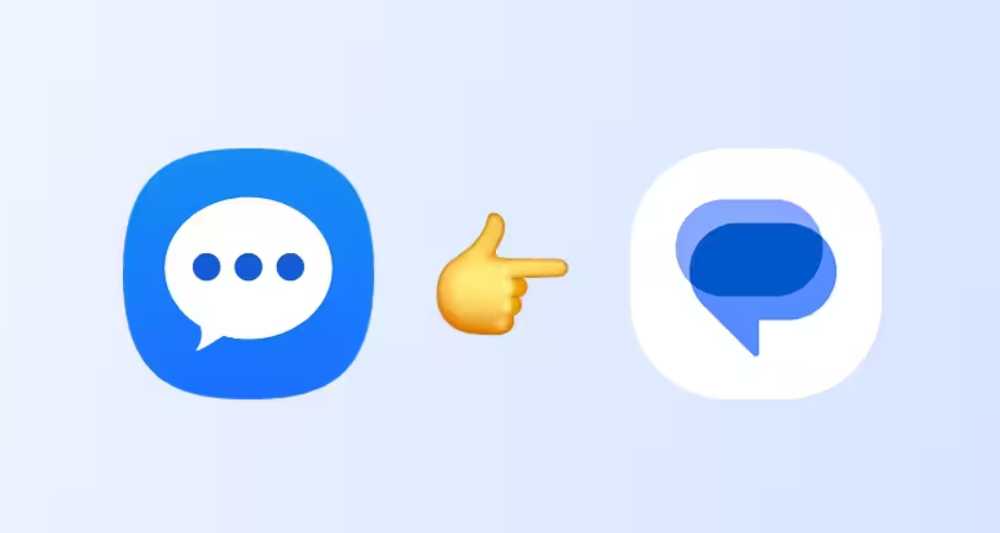
Samsung has officially confirmed that its Samsung Messages app will be shut down in July 2026 — ending more than a decade as the default texting app on Galaxy phones. In an End of Service announcement posted on its website, Samsung directed all Galaxy users to switch to Google Messages before the deadline.
This transition has been building since 2021, when Samsung began shipping the Google-aligned Android experience with the Galaxy S21 series. It picked up pace in 2024 when the Galaxy Z Fold 6 and Z Flip 6 launched without Samsung Messages pre-installed. Now it’s official — and the clock is running.
⚠️
Action Required: If you still use Samsung Messages on Android 12 or newer, your app will stop sending and receiving standard texts after July 2026. Only emergency messages will remain available. Switch now to avoid any interruption.
The Texts Are Numbered — Samsung Messages Gets a Shutdown Date
Everything Galaxy users need to know before July 2026
⏱ DEADLINE: JULY 2026
Time Left Until Samsung Messages Goes Dark
—
Weeks
—
Days
—
Hours
—
Minutes
Based on July 1, 2026 — Samsung will confirm the exact date inside the app
By the numbers
Samsung Messages — Key Facts
Figures from Samsung’s official announcement and product timeline
~12
Weeks to switch from today (April 2026)
3B+
WhatsApp users globally — the messaging giant it never dethroned
2021
Year Samsung started defaulting to Google Messages (Galaxy S21)
Android 11↓
Devices on Android 11 or older are NOT affected by the shutdown
How we got here
The Road to the End of Samsung Messages
A years-long transition, finally made official
2009 – 2010
Samsung Messages launches with Galaxy
Samsung Messages arrived as the stock SMS client on early Galaxy phones, becoming the default texting experience for millions of Android users worldwide.
2019
One UI upgrade gives it a new life
Samsung Messages received a significant refresh with the launch of One UI — including a one-handed focused layout and a pitch-black dark mode. It felt modern again, briefly.
2021 — Galaxy S21
Google Messages becomes the default
Samsung started shipping the Galaxy S21 series with Google Messages as the default SMS and RCS app — first outside the US, marking the beginning of the end for Samsung Messages as the primary client.
July 2024
Samsung stops pre-installing the app
Starting with the Galaxy Z Fold 6 and Z Flip 6, Samsung stopped pre-loading Samsung Messages entirely on new flagship devices in certain regions.
Early 2025 — Galaxy S25
Galaxy S25 ships without Samsung Messages
The Galaxy S25 series launched globally with no Samsung Messages app pre-installed at all. Google Messages was the only built-in SMS option.
April 5, 2026
Official end of service confirmed
Samsung posted its formal End of Service announcement on its US website. July 2026 is confirmed as the cutoff. Galaxy S26 users are already blocked from downloading Samsung Messages.
Side by side
Samsung Messages vs. Google Messages
What you’re keeping, what you’re gaining
💬
Samsung Messages
ENDING JULY 2026
✅ SMS & MMS messaging
✅ One UI theme integration
✅ RCS (carrier-dependent)
❌ No universal cross-carrier RCS
❌ No built-in AI scam detection
❌ No Gemini AI features
❌ Limited multi-device sync
✉️
Google Messages
ACTIVE REPLACEMENT
✅ SMS, MMS & full RCS
✅ Universal RCS — Android & iOS
✅ AI-powered scam & spam detection
✅ Gemini AI — smart replies, photo remix
✅ Sync across phone, tablet, watch
✅ Real-time typing indicators
✅ High-quality media sharing
Need to know
What Happens After July 2026?
Tap each question for the full details
After the July 2026 cutoff, Samsung Messages will no longer send or receive standard SMS or MMS messages. The only exception: you can still use it to contact emergency service numbers or emergency contacts already saved in your device. Everything else stops.
No. Samsung’s official announcement confirms that devices running Android 11 or lower are not affected by this End of Service. Samsung Messages will continue to work on those older devices. The change applies to Android 12 and newer.
Galaxy Watches launched before the Galaxy Watch 4 series (running Tizen OS) will lose the ability to view full message conversation histories. However, those watches will still be able to read and send new text messages as they arrive. Galaxy Watch 4 and newer run Wear OS and are not affected in the same way.
Samsung has noted that for pre-2022 Galaxy devices, switching messaging apps may temporarily disrupt ongoing RCS conversations. Regular SMS and MMS will still work during this period. RCS conversations can resume once both parties are using Google Messages. Newer devices should not face this issue.
No. Once Samsung Messages is discontinued, it will no longer be available for download from the Galaxy Store. Galaxy S26 and newer users are already blocked from downloading it. All other devices will lose Galaxy Store access to the app after the July cutoff.
Samsung cited the goal of maintaining “a consistent messaging experience on Android.” Google Messages offers universal RCS support regardless of carrier — something Samsung Messages depended on individual mobile networks for. This move also fits a wider pattern of Samsung integrating deeper with Google’s Android ecosystem, including AI features via Gemini that have displaced Samsung’s own Bixby in several areas.
Check your device
Are You Affected?
Based on Samsung’s official End of Service notice
⚠️ Action Needed
Android 12 or Newer
You must switch to Google Messages before July 2026. Samsung Messages will stop working for standard texts after the cutoff.
✅ Not Affected
Android 11 or Older
Samsung confirmed these devices are exempt from the End of Service. Samsung Messages will continue to work on Android 11 and below.
⚠️ Partial Impact
Tizen OS Galaxy Watches (pre-Watch 4)
Full conversation history on the watch will no longer be viewable. Sending and reading new texts individually will still work.
⚠️ Already Blocked
Galaxy S26 & Newer
Galaxy S26 users cannot download Samsung Messages from the Galaxy Store — Google Messages is already the only option on these devices.
Step by step
How to Switch to Google Messages
Samsung will guide you in-app — or follow these steps manually
1
Open or install Google Messages
Download Google Messages from the Google Play Store if it isn’t already on your device. Most Galaxy phones running Android 12+ will already have it.
2
Set it as your default SMS app
When you open Google Messages, a prompt appears asking to set it as your default. Tap “Set as default” and select Google Messages from the list.
3
Or go via Settings
Navigate to Settings → Apps → Choose default apps → SMS app, and select Google Messages manually from there.
4
Check the in-app notification
Samsung Messages will display the exact final shutdown date in-app. Watch for that notification for your specific region’s cutoff date.
Samsung’s End of Service announcement covered the July 2026 discontinuation of Samsung Messages, the steps required to transition to Google Messages, the device categories affected, and the exceptions for older hardware. The shift to Google Messages was covered as part of a multi-year transition that began with the Galaxy S21 series in 2021.
The announcement discussed the feature differences between the two apps — including RCS support, Gemini AI features, and multi-device messaging — alongside specific guidance for Galaxy Watch users on Tizen OS and Samsung device owners running Android 11 or lower. For more on how this fits into the broader Android-iOS messaging landscape in 2026, the ongoing platform competition between Apple and Android remains active context.