
Apple iOS 27 Child Safety: Ask to Browse Gates Every Website Kids Visit as Apps Get 30% Faster

GigaNectar Team

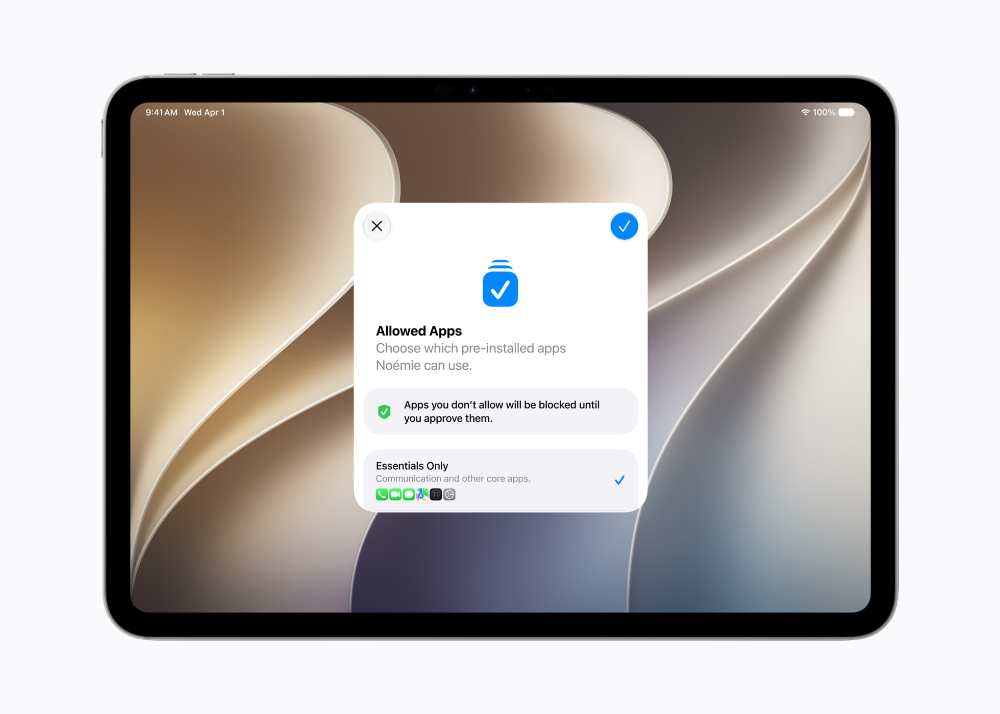
An iPad Pro displays the Setup Assistant screen for child account app restrictions, showing options for essential apps and a recommended starter set

Apple previewed iOS 27 at its annual Worldwide Developers Conference in Cupertino on June 9, 2026 — and child safety got more attention than ever before. New parental controls, a redesigned Screen Time, and a set of features that give parents real-time oversight over what their kids see, who they talk to, and when they use their devices were among the headline announcements. The update arrives this fall for iPhones as far back as the iPhone 11, released in 2019. Meanwhile, iOS 27 also brings meaningful performance improvements — apps launch 30% faster — alongside the Liquid Glass interface changes that launched in iOS 26.

A person and a child sit together at a wooden table, interacting with an iPad
Caption: Apple’s child safety tools for iOS 27 were developed in consultation with clinical researchers and online safety experts, including the American Academy of Pediatrics. Photo Source: Apple (Proprietary, All Rights Reserved)
30%Faster app launch times
80%Faster AirDrop transfers
70%Faster photo loading
1.5B+Active iPhones worldwide

What speed improvements are coming with iOS 27?

iOS 27 is being described internally as Apple’s “Snow Leopard moment” — a reference to the 2009 macOS release focused almost entirely on under-the-hood performance rather than new features. The update introduces a redesigned CPU scheduler that adapts technology previously reserved for newer Apple Silicon chips and extends it to older hardware, including the iPhone 11. Apps launch up to 30% faster on both first- and third-party apps. AirDrop photo and file transfers are up to 80% faster, and new photos appear in the Photos library up to 70% faster after being taken. File browsing between an iPad and external storage is up to five times faster.

App launch speed
+30%
AirDrop transfer speed
+80%
Photo library load
+70%
iPad external storage
5× faster

Every new child safety feature, explained

Apple’s VP of Health and Fitness, Dr Sumbul Desai, took the stage at WWDC 2026 to present the child safety updates — a notable shift from her usual health app appearances. The suite covers what children can see, who they can talk to, and when they can use their devices. Tap any feature below for details.

🔍
Ask to Browse
Parental approval for new websites
Ask to Browse builds on the existing “Ask to Buy” feature for apps. When a child running iOS 27 tries to open a website not already approved, a request is sent to the parent’s device via Messages. The parent approves or declines with one tap. The feature works across iPhone, iPad, and Mac, and is on by default for children under 13. Unlike older Screen Time controls where parents had to manually whitelist URLs — often an unmanageable task — Ask to Browse puts the decision-making in real time, at the child’s request.
📱
App access control
Start small, add gradually
App access control lets parents choose exactly which apps are on a child’s device when first setting up a child account. Options include starting with a small set of essential apps, using a curated set, or hand-picking apps one by one. Parents can then add more apps over time. The existing “Ask to Buy” feature — which requires parental approval before any free or paid download or in-app purchase from the App Store — continues alongside these new controls.
💬
Communication safety
Blocks nudity and violent content
Communication Safety already blurred detected nudity in Messages and FaceTime for users under 18. In iOS 27, the feature is expanded to also detect and block gore or violent content in shared images and videos, alongside the existing nudity protection. It remains on by default for under-18 users. Images are scanned on-device — nothing is transmitted to Apple servers.
Time allowances
Per-category limits with schedules
Time Allowances give parents per-category limits across Entertainment, Games, Social Media, and other app groups. When configuring limits, the interface shows guidance drawn from expert research and calibrated to the child’s age — giving parents a starting point they can adjust. Parents can also set daily Schedules to manage which apps are accessible at different times of day, for instance blocking certain apps during school hours or at bedtime. If a child needs extra time in an app, parents can extend access directly from their own device.
👥
New contact approval
Parents approve before kids connect
New contact approval means that when a child wants to communicate with someone not already in their approved contact list — over Messages, FaceTime, or Phone — the parent is asked for approval before the connection is established. This applies to all three communication channels and works alongside Communication Safety’s content-scanning tools.
📊
Redesigned Screen Time
At-a-glance usage dashboard
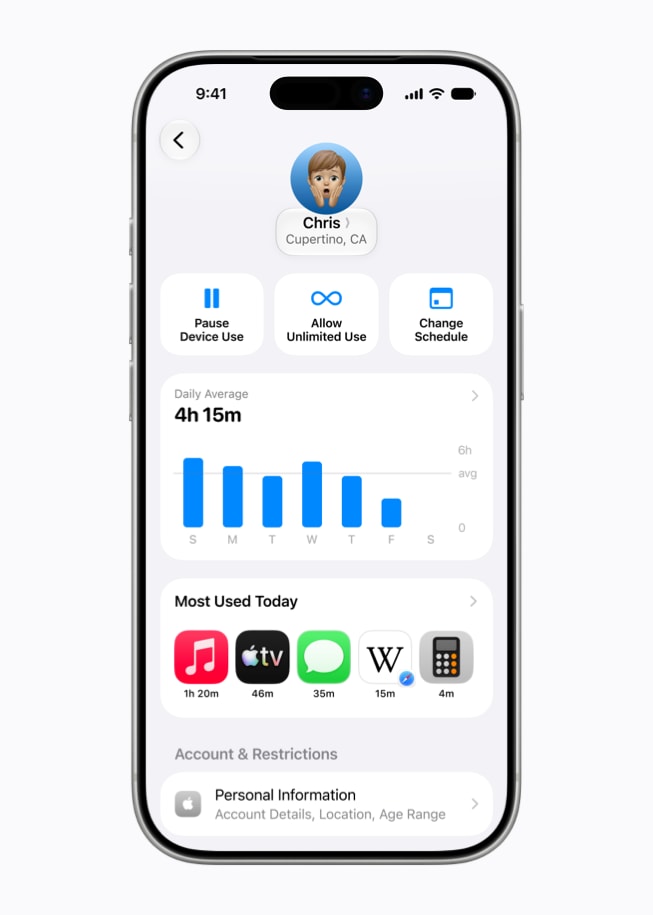
Redesigned Screen Time gives parents a dashboard showing their child’s average daily device use and most-used apps at a glance, without navigating deep into settings. From the same view, parents can adjust app access, set limits, or temporarily block specific apps — for example, during meals or outdoor activities. The passcode notification system (which alerts parents when the Screen Time passcode is entered on a child’s device) has also been updated and continues in iOS 27.
An iPad Pro shows an Ask to Browse website prompt, while an iPhone 17 Pro shows the approval request in Messages
Caption: Ask to Browse works across iPhone, iPad, and Mac with Safari, and is turned on by default for children under 13. Photo Source: Apple (Proprietary, All Rights Reserved)

“Our approach to helping families create safer digital experiences is grounded in the belief that every child is unique. That’s why we build simple and intuitive tools, based on expert guidance, to let parents tailor their kids’ digital journey.”

— Dr Sumbul Desai, M.D., VP of Health and Fitness, Apple (WWDC 2026 keynote, June 9, 2026)

Apple said it is also working with the American Academy of Pediatrics (AAP) to adapt the AAP’s Family Media Plan into a reference guide for parents using Apple products. The collaboration is part of Apple’s ongoing effort to integrate clinical and child-development research into its parental tools.

Which features apply to your child’s age?

A child account is required for children under 13 and available for users up to 18. Select an age group below to see which controls are active.

Age-based feature guide

Child account (required under 13)
Ask to Browse (default on)
Ask to Buy for App Store
Parental app access control
Communication Safety (default on)
New contact approval
Time Allowances
Scheduled app access
Ask to Browse (optional for 13+)

All controls are active. Child accounts are required for under-13s.

Child account (required under 13)
Ask to Browse (default on)
Ask to Buy for App Store
Parental app access control
Communication Safety (default on)
New contact approval
Time Allowances
Scheduled app access
Ask to Browse (optional for 13+)

All controls active. Ask to Browse is on by default for under-13s.

Child account (required under 13)
Ask to Browse (default on under 13)
Ask to Buy for App Store
Parental app access control
Communication Safety (default on)
New contact approval
Time Allowances
Scheduled app access
Ask to Browse (optional — parent choice)

Child account available up to 18. Ask to Browse is optional from 13 onwards.
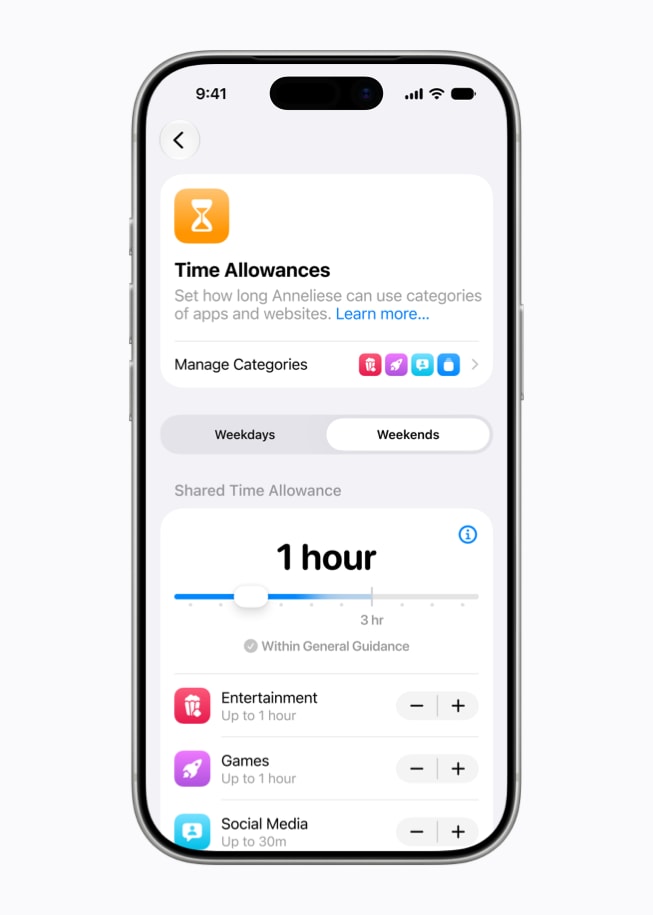
An iPhone 17 Pro shows the Time Allowances settings screen with options to manage categories including Entertainment, Games, and Social Media
Caption: Time Allowances apply across Entertainment, Games, Social Media, and other categories, with age-calibrated guidance from expert research as a starting point for parents. Photo Source: Apple (Proprietary, All Rights Reserved)

How does this affect Meta’s teen account approach?

Apple’s push comes as Meta has been expanding teen account protections across Instagram, Facebook, and Messenger — rolling out default content restrictions and parental supervision tools globally. Both companies are facing pressure from legislators and advocacy groups. Apple’s approach focuses on device-level and OS-level controls, including on-device scanning that does not send content to Apple servers. Meta’s controls operate at the platform level within its individual apps.

iOS 27 timeline: from WWDC to your device
June 9, 2026
iOS 27 previewed at WWDC 2026 in Cupertino. Developer beta 1 released same day.
July 2026 (expected)
Public beta available for users willing to test pre-release software.
September 2026 (expected)
Full public release of iOS 27, iPadOS 27, and macOS 27 alongside new hardware. All child safety features go live after installing the Screen Time update. Compatible devices: iPhone 11 and later.
Fall 2026 (expected)
iPhone 18 lineup and Apple’s widely anticipated foldable iPhone expected to launch with iOS 27 pre-installed.
An iPhone 17 Pro shows the redesigned Screen Time dashboard with daily average usage, most used apps, and controls to pause the device
Caption: Screen Time’s redesign is part of iOS 27’s broader focus on making parental controls simpler to use, announced at WWDC 2026 on June 9, 2026. Photo Source: Apple (Proprietary, All Rights Reserved)

Apple’s iPhone business: why this platform matters

The iPhone remains Apple’s largest revenue segment by far. In fiscal year 2025, iPhone generated $209.5 billion — 50% of Apple’s total $416.1 billion in revenue. Services, including the App Store, Apple Music, and Apple Pay, came in second at $109.1 billion. There are more than 1.5 billion active iPhones in use worldwide.

iPhone
$209.5B
50%
Services
$109.1B
26%
Wearables
$35.7B
9%
Mac
$33.7B
8%
iPad
$28.0B
7%

Apple’s growing reliance on the App Store and services also raises the stakes for maintaining a trusted platform for children. The company’s dedicated child safety resources page and the launch of tools like Apple Watch For Your Kids — which lets children stay connected via calls and messages without a full iPhone — form part of the broader ecosystem approach. Developers building iOS apps are being asked to integrate Apple’s SensitiveContentAnalysis and PermissionKit frameworks, and to use the Declared Age Range API to tailor in-app experiences to a child’s age without sharing their birthday.

The broader AI safety conversation also intersects here: as AI features arrive deeper inside iOS — through competing AI models and Apple Intelligence — how content moderation and safety guardrails operate on children’s devices is expected to be a continuing area of focus.

A MacBook Pro, iPad Pro, and iPhone 17 Pro arranged side by side showing various screens related to Apple's updated child safety features
Caption: The child safety features in iOS 27 are also coming to iPadOS 27 and macOS 27, with availability confirmed for fall 2026 following the Screen Time update. Photo Source: Apple (Proprietary, All Rights Reserved)

Apple’s iOS 27 child safety features — including Ask to Browse, Time Allowances, expanded Communication Safety, and the redesigned Screen Time — were covered as part of the WWDC 2026 announcement on June 9, 2026. The update also includes performance improvements affecting app launch times, AirDrop speeds, and photo loading across all supported devices back to the iPhone 11. The new parental controls are scheduled to arrive with iOS 27, iPadOS 27, and macOS 27 this fall.


Leave a comment